Python 1-1#
Input, output, variables, types, conditionals
Input => Process => Output#
Identify the problem inputs (requirements)
Identify the problem outputs (results)
Write an algorithm to transform inputs to outputs.
If you don’t know how to do a step… research it!

Python input and output#
print() does output
input() does input, returns input so you must assign it to a variable
1x = input("Enter something: ")
2print(x)
Enter something:  jdshak
jdshak
Code Challenge 1-1-1#
Write a program to input your first name and last name then output your last name, first name
F-Strings#
F-Strings are Python’s answer to string interpolation.
This replaces the variable name with its value within a string.
Called an F-string because the
ftells Python to interpolate the string.
1name = 'George'
2print("{name} was curious.")
3print(f"{name} was curious.")
Check Yourself 1#
Which is an example of a properly used string literal?
A. print(welcome)
B. print("welcome")
C. print "welcome"
D. print welcome
Vote Now: https://poll.ist256.com#
Variables#
Variables are named areas of computer memory for storing data.
The name can be anything but should make symbolic sense to the programmer.
We write to the variable’s memory location with the assignment statement (=)
We read from the variable by calling its name.
Variable names must begin with a letter or _ and must only contain letters, numbers or _.
Variables are of a Specific Type#
| Type | Purpose | Examples |
|---|---|---|
int |
Numeric type for integers only | 45, -10 |
float |
Numeric type floating point numbers | 45, -10 |
bool |
True or False values | True, False |
str |
Characters and text | "A", 'Mike' |
Type Detection and Conversion#
| Python Function | What It Does | Example of Use |
|---|---|---|
type(n) |
Returns the current type of n | type(13) == int |
int(n) |
Converts n to type int | int("45") == 45 |
float(n) |
Converts n to type float | float(45) == 45.0 |
str(n) |
Converts n to type str | str(4.0) == '4.0' |
Programmatic Expressions#
Programmatic Expressions contain operators and operands. They evaluate to a value, preserving type:
1print(2 + 2)
2print(2.0 + 2)
3print("sh" + 'ip')
4print('hi' + 2) # error
4
4.0
ship
---------------------------------------------------------------------------
TypeError                                 Traceback (most recent call last)
Cell In[4], line 4
      2 print(2.0 + 2)
      3 print("sh" + 'ip')
----> 4 print('hi' + 2)

TypeError: can only concatenate str (not "int") to str
Arithmetic Operators#
| Operator | What it Does | Example of Use |
|---|---|---|
+ |
Addition or string concenation | 3 + 4 == 7 |
- |
Subtraction | 4 - 3 == 1 |
* |
Multiplication | 3 * 4 == 12 |
/ |
Division | 4 / 3 == 1.33333 |
// |
Intger division (quotent) | 13 // 3 == 4 |
% |
Modulo (remainder) | 13 % 3 == 1 |
( ) |
Force an order of operations | 2 * (3 + 4) == 14 |
Code Challenge 1-1-2#
Let’ write a program to divide up the check among diners in a party.
Write a program to input the amount of a restaurant check, tip %, and number of diners
The program should output the total amount with tip, and the amount each diner owes.
Check Yourself: Which Type 1?#
What is the value of str(314) ?
A. 314
B. "314"
C. int
D. '34.0'
Vote Now: https://poll.ist256.com#
Check Yourself: Which Type 2?#
What is the value of type(314.0) ?
A. 314
B. float
C. int
D. '314.0'
Vote Now: https://poll.ist256.com#
Check Yourself: Operators#
What is the output of the following python code?
a = 10
b = 2
c = 1 + (a/b)
print(c)
A. 6
B. 5.5
C. 6.0
D. 5
Vote Now: https://poll.ist256.com#
Program Flow Control with IF#
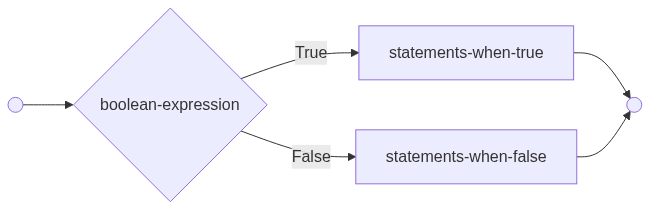
The IF statement is used to branch your code based on a Boolean expression.
1if boolean-expression:
2    statements-when-true
3else:
4    statemrnts-when-false
Python’s Relational Operators#
| Operator | What it does | Examples |
|---|---|---|
> |
Greater than | 4>2 (True) |
< |
Less than | 4<2 (False) |
== |
Equal To | 4==2 (False) |
!= |
Not Equal To | 4!=2 (True) |
>= |
Greater Than or Equal To | 4>=2 (True) |
<= |
Less Than or Equal To | 4<=2 (True) |
Expressions consisting of relational operators evaluate to a Boolean value
Code Challenge 1-1-3#
a presssure sensor determines whether or not to open a door
When the pressure is larger than 10 we want the door open
otherwise we want it closed
write code to simulate this
Check Yourself: Relational Operators#
On Which line number is the Boolean expression True?
1x = 15
2y = 20
3z = 2
4x > y
5z*x <= y
6y >= x-z
7z*10 == x
A. 4
B. 5
C. 6
D. 7
Vote Now: https://poll.ist256.com#
Python’s Logical Operators#
| Operator | What it does | Examples |
|---|---|---|
and |
True only when both are True | 4>2 and 4<5 (True) |
or |
False only when both are False | 4<2 or 4==4 (True) |
not |
Negation(Opposite) | not 4==2 (True) |
in |
Set operator | 4 in [2,4,7] (True) |
Check Yourself: Logical Operators#
On Which line number is the Boolean expression True?
1raining = False
2snowing = True
3age = 45
4age < 18 and raining
5age >= 18 and not snowing
6not snowing or not raining
7age == 45 and not snowing
A. 4
B. 5
C. 6
D. 7
Vote Now: https://poll.ist256.com#
Multiple Decisions: IF ladder#
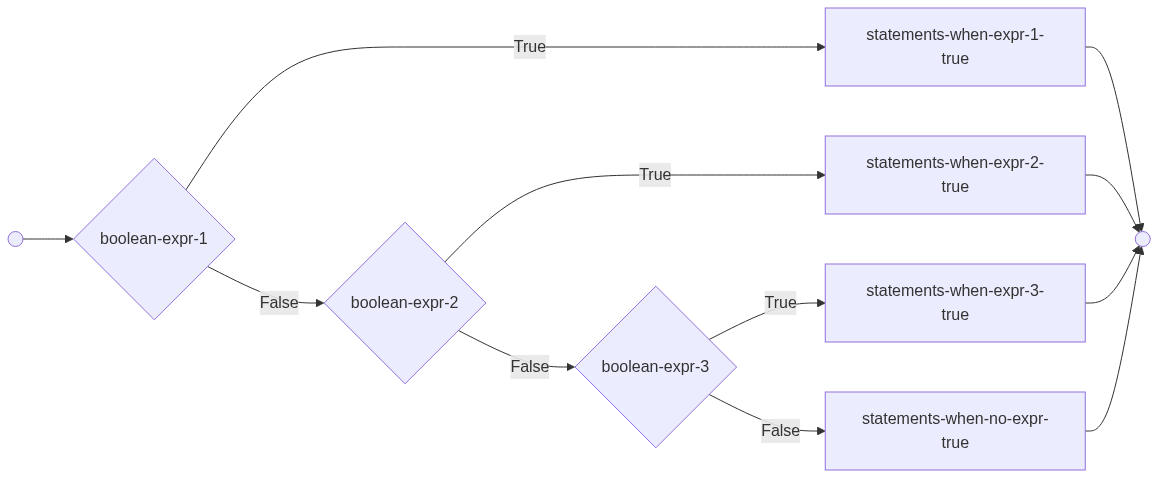
Use elif to make more than one decision in your if statement. Only one code block within the ladder is executed.
1if boolean-expression1:
2    statements-when-exp1-true
3elif boolean-expression2:
4    statements-when-exp2-true
5elif boolean-expression3:
6    statements-when-exp3-true
7else:
8    statements-none-are-true
 1#Elif versus multiple ifs...
 2# One decision or multiple decisions.
 3
 4x = int(input("enter an integer"))
 5
 6# one decision
 7if x>10:
 8    print("A:bigger than 10")
 9elif x>20:
10    print("A:bigger than 20")
11
12    # Multiple decisions
13if x>10:
14    print("B:bigger than 10")
15if x>20:
16    print("B:bigger than 20")
enter an integer 50
A:bigger than 10
B:bigger than 10
B:bigger than 20
Check Yourself: IF Statement#
Assuming values x = 25 and y = 6 what value is printed?
1if x > 20:
2    if y == 4:
3        print("One")
4    elif y > 4:
5        print("Two")
6    else:
7        print("Three")
8else:
9    print("Four")
A. One
B. Two
C. Three
D. Four
Vote Now: https://poll.ist256.com#
Code Challenge 1-1-4#
Number to Letter grade#
Letter grades in a college class are computed as follows:
95 and above is an A
75 and above, but below 95 is a B
50 and above, but below 75 is a C
below 50 is F
Write a program to input the number grade and calculate the letter grade
Re-write to account for “bad” grades > 120 or < 0