Git and GitHub Diagram and Terms#
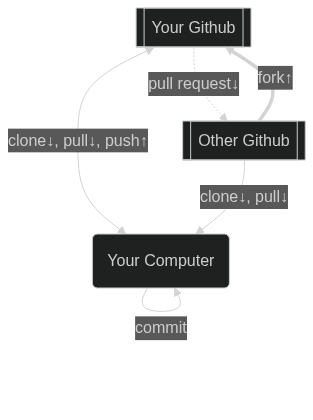
Here’s a quick diagram to help you understand the typical git/github interactions along with common terms used in the git process.
Legend#
Your github - a fork of the Assignment or Class Repository
Other Github - the official course assignment or Class repoistory
Your Computer - working local on the Repository or in Codespaces
Actions#
Commit - Save local changes into the Git repo. A commit is a bundle of changes, and what are pushed or pulled.
Push - Send local commits to Github (your remote)
Pull - Download Github (your remote) commits to your computer
Fork - make a cloud copy of another Github Repository
Clone - make a local copy of a Github repository.
Terms#
working copy - the cloned local copy on your computer or Codespaces
remote/origin - the copy of the Repository on Github
upstream - the source Fork of a Github Repositry
pull request - ask a Github Repository to merge in your changes because you don’t have permission to push.